

|
|
|
| Source Code |

|

|
| 3 | Code Libraries |   |
|   |
Subclassing Without The Crashes |
|
|
Take advantage of stable and reliable subclassing with this all VB ActiveX DLL |
|
NOTE:
this code has been superceded by the version at the new site.
|
|   |
Sample projects which demonstrate the SSubTmr DLL
|
|||||||||
|   |
Contents of this article
Introduction Prior to VB5, it was impossible to subclass a control without relying on a proprietary custom control. This greatly restricted what you could if you wanted to play around with some of the neater customisation features - creating a new control was completely out, finding out in detail what was going on with menus was impossible and so on. The introduction of the AddressOf operator to VB5 now allows you to subclass, although it is not nearly as simple as it ought to be. The SSUBTMR component is a stable and consistent way of working around difficulties in subclassing. You can either use it as an external DLL to provide a (more) crash-proof way of debugging subclassed components, or by including one module and one interface class, you can compile it directly into your application once you are happy the subclassing is working. SSUBTMR is the basis for most of my controls. The component itself mostly uses the SubTimer.DLL component code from the Hardcore Visual Basic book written by Bruce McKinney, however it has a couple of very useful enhancements which I'll describe later.  Back to top Back to top
The Problem With Subclassing If you develop ActiveX controls and intend to subclass or hook a window, you'll very quickly discover that doing it is not at all straightforward. A typical problem is that a control which works fine when there is a single instance on a form suddenly stops working or starts GPFing when you place two instances on the form. Why is this happening? The AddressOf operator requires you to place the callback routine in a module (and most annoying this is too!). This module is shared between all instances of your control and therefore the variables and subroutines contained by that module are also shared. To visualise the situation, consider a control which wants to know if its parent has changed size. To do this, you create a callback routine in a module to handle the WndProc callback. Then, you want to add this callback routine to the parent's window handle so you will be routed all the parent's messages. To add the callback, you change the parent's GWL_WNDPROC Window Long to the address of your WndProc function. This function returns a pointer to the previously installed WndProc function, which you must be sure to forward all messages to that you aren't fully handling yourself (otherwise you quickly find your control will do nothing or even worse, prevent its container from doing anything!). When you remove an instance of your control, you need to put the old WndProc back again. The following diagrams show how easy it is to end up with one control not functioning in this circumstance, because of the sharing of variables in the module: With One Instance of Your Control  With Two Instances  You can correct this problem by storing a separate WndProc for each control instance that gets created. However, there is now a much more difficult problem to solve - how to make sure your control terminates correctly. The WndProc function in the module receives all the messages, but you need to pass this information on to your UserControl for the control to do anything about the messages. Therefore the module needs to know about the instance of the control it wants to inform about the message. Since the module is shared between all instances of the UserControl in question, it will need to know which hWnd is associated with which UserControl instance, and also needs to be sure it only installs the WindowProc function for the same hWnd once. You might think you can get around this by storing an array of references to UserControls in your WindowProc handler message, and when you receive a message, you then enumerate through your array and inform each item in turn. Well, I tried this and there is a big downside. If your module holds a reference to any UserControl instance, it will not allow the UserControl object to be released unless it VB figures out that the reference has gone out of scope or if you set the object to nothing. However, unless you can arrange for the user of the control to call a method before the UserControl is destroyed, it is impossible for the reference to go out of scope! Often the user of the control will forget to call this method, or will press the Stop button in VB IDE, or call End, the consequences being:
Back to top
Fixing It - Slimy Hacks and Neat Tips Two things you need to fix these problems are:
  Declare Sub CopyMemory Lib "kernel32" Alias "RtlMoveMemory" ( _     lpvDest As Any, lpvSource As Any, ByVal cbCopy As Long)   Private Property Get ObjectFromPtr(ByVal lPtr As Long) As Object   Dim oThis As Object     ' Turn the pointer into an illegal, uncounted interface     CopyMemory oThis, lPtr, 4     ' Do NOT hit the End button here! You will crash!     ' Assign to legal reference     Set ObjectFromPtr = oThis     ' Still do NOT hit the End button here! You will still crash!     ' Destroy the illegal reference     CopyMemory oThis, 0&, 4     ' OK, hit the End button if you must--you'll probably still crash,     ' but this will be your code rather than the uncounted reference!   End Property   Private Property Get PtrFromObject(ByRef oThis As Object) As Long     ' Return the pointer to this object:     PtrFromObject = ObjPtr(oThis)   End Property That gives the general picture of how to do it. You can improve matters by typing the variables of type 'object' to suit your particular application. This is an excellent feature. Windows has functions which allow you to store as many long values as you want against a named field for a given hWnd. Here are the functions:     (ByVal hwnd As Long, ByVal lpString As String) As Long   Declare Function SetProp Lib "user32" Alias "SetPropA" _     (ByVal hwnd As Long, ByVal lpString As String, ByVal hData As Long) As Long   Declare Function RemoveProp Lib "user32" Alias "RemovePropA" _     (ByVal hwnd As Long, ByVal lpString As String) As Long You use them like this:   ' To set a property called 'NumberOfInstances' to 3 for a form:   SetProp Me.hWnd, "NumberOfInstances", 3   ' To get the 'NumberOfInstances' value:   lNumber = GetProp(Me.hWnd, "NumberOfInstances")   ' To delete the property when finished with it   ' (Windows does this automatically when the application is ended):   RemoveProp Me.hWnd, "NumberOfInstances" You can use these functions to store as much information as you want against a given hWnd, and this is a perfect place to store pointers to objects which your subclassed window proc is going to call to, not to mention the old window proc value. Back to top
SSUBTMR Implementation SSUBTMR implements these techniques to produce a stable subclasser which you can use regardless of how many instances you have and how many controls want to attempt to subclass the same hWnd. The implementation is very similar to the SubTimer component from Hardcore Visual Basic, but with some improvements. The subclassing consists of three parts:
For reference, here are the window properties SSUBTMR uses to manage the subclassing process: C[hWnd] Stores the number of instances using the subclass. When the property is 0 and you add to the subclass, it installs the WindowProc. Subsequent additions just increment the counter and use the existing WindowProc. When items are removed, the count is decremented, until it gets to zero, when the WindowProc is removed again. [hWnd]#[Message]C The count of how many times the message [Message] is attached to the hWnd [hWnd]. This allows you to subclass the same message on the same hWnd more than once. For example, if a control wants to subclass it's parent, and you place two controls on the same parent, you need both controls to be able to receive that message. [hWnd]#[Message]#[Number] Stores a pointer to the object which wants to receive notification for the hWnd/Message combination. Back to top
Differences between SSUBTMR and the Hardcore Visual Basic version There are five main differences between this component and the one provided with Hardcore Visual Basic:
Back to top
Quick Start - How to Use SSUBTMR To quickly get started with subclassing, here is a simple example which demonstrates how to prevent a form from being resized smaller than a certain width and height. This is also available in the demonstration project download. Step 1 Create a new Standard EXE project. Step 2 Add a reference to SSUBTMR.DLL. This appears in the references list as 'Subclassing and Timer Assistant (with configurable message response, multi-control support + timer bug fix)' Step 3 Implement the Subclassing interface: In the declarations section, add the following code:   Implements ISubClass Make sure that the required interfaces are supported under the ISubClass section:   Private Property Let ISubClass_MsgResponse(ByVal RHS As EMsgResponse)     ' This Property Let is not really needed!   End Property   Private Property Get ISubClass_MsgResponse() As EMsgResponse     ' This will tell you which message you are responding to:     Debug.Print CurrentMessage     ' Tell the subclasser what to do for this message (here we do all processing):     ISubClass_MsgResponse = emrConsume   End Property   Private Function ISubClass_WindowProc( _     ByVal hWnd As Long, ByVal iMsg As Long, ByVal wParam As Long, ByVal lParam As Long _     ) As Long     Debug.Print "Got Message"   End Function Step 4 Now you have a template for all subclassing projects, here is the code you need to prevent form resizing smaller than a certain size: Declarations: Private Declare Sub CopyMemory Lib "kernel32" Alias "RtlMoveMemory" ( _     lpvDest As Any, lpvSource As Any, ByVal cbCopy As Long) Private Type POINTAPI     x As Long     y As Long End Type Private Type MINMAXINFO     ptReserved As POINTAPI     ptMaxSize As POINTAPI     ptMaxPosition As POINTAPI     ptMinTrackSize As POINTAPI     ptMaxTrackSize As POINTAPI End Type Private Const WM_GETMINMAXINFO = &H24 To start and stop subclassing: Private Sub Form_Load()     AttachMessage Me, Me.hwnd, WM_GETMINMAXINFO End Sub Private Sub Form_QueryUnload(Cancel As Integer, UnloadMode As Integer)     DetachMessage Me, Me.hwnd, WM_GETMINMAXINFO End Sub The code to handle the WM_GETMINMAXINFO message: Private Function ISubclass_WindowProc(ByVal hwnd As Long, ByVal iMsg As Long, ByVal wParam As Long, ByVal lParam As Long) As Long Dim mmiT As MINMAXINFO     ' Copy parameter to local variable for processing     CopyMemory mmiT, ByVal lParam, LenB(mmiT)         ' Minimium width and height for sizing     mmiT.ptMinTrackSize.x = 128     mmiT.ptMinTrackSize.y = 128             ' Copy modified results back to parameter     CopyMemory ByVal lParam, mmiT, LenB(mmiT) End Function Another sample included in the demonstration shows how to create Windows graduated title bar effects like those in the image below: 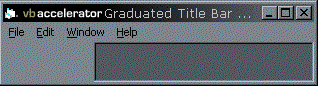
|
  |

|
|
|
About Contribute Send Feedback Privacy
|
|
 Updated
 Download the SSubTmr.DLL for VB5 (11kb)
 Download the SSubTmr6.DLL for VB6 (11kb)
