|
|
|
| Highlights |
|
NOTE:
this page has been superceded by the version at the new site.
|

|
|
Just to give you an idea of the type of things you can find on this site,
here are the current highlights: |
  |
| Toolbars and Rebars |   |   | ||
|   |
|
The vbAccelerator CoolMenu, Toolbar and Rebar Control just
got better. Now you can create applications with the professional finish of Office 97 and Explorer.
There are loads of new toolbar features like drop-down buttons, all flat buttons with mouse-over image change support,
customisable text and style, button auto-sizing, list-style buttons and invisible buttons. On top of that, there is a full rebar implementation allowing complete IE toolbar functionality - seamless movement of toolbar bands, full control over band sizing and visibility and the ability to add any VB control to the the rebar. The toolbar is supported by a full Image List control/class with many outstanding improvements to the VB version. |
  | |
|   | S-Grid |   | ||
|   |
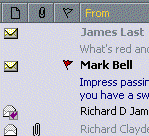
The SGrid control is an all-VB grid which can emulate the Outlook messages list,
including grouping of messages and message preview. The highly optimised display code
makes this grid draw faster than FlexGrid and other VB grids even while it allows
more sophisticated displays to be set up. It is also a good replacement for a ListView in report mode.
Using this 240kb control you can span column text across rows, freely set row and column heights, set colours and fonts for each cell, add icons to cells, sort and group data and much more... |
|
  | |
|   |
Owner-Draw Combo and List Boxes
 Version 2.1 30 May 1999 Version 2.1 30 May 1999
|
  | ||
|   |
|
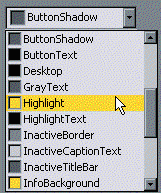
The Owner Draw Icon and Combo Box control is a complete
solution for custom combo boxes. You can use it to create colour pickers (like the one shown on the left),
paragraph style choosers showing different fonts, alignments and sizes, Explorer style hierarchical drop down boxes,
line style pickers and much more.
The control comes with 7 built-in owner draw styles, and raises events to your VB code should you want to design your own items. The basic control is fully compatible with the standard VB list boxes and combo boxes enabling a quick replacment in existing projects. Beyond the owner-draw capabilities, the control also allows drop-downs to have any width, to be shown at any position on the screen and includes find methods. |
  | |

|
|
|
About Contribute Send Feedback Privacy
|
|