|   |
Detecting when another application is activated
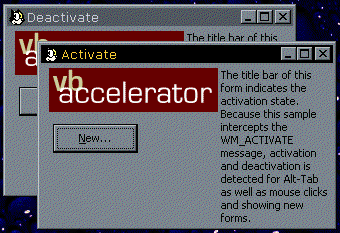
 Download the Deactivation detection sample project (13kb) Download the Deactivation detection sample project (13kb)
|   |
Before you Begin
|
  |
|   |
 |
This project requires the SSubTmr.DLL component. Make sure you have loaded and registered this before trying the project.
|
  |
In a form, there is a Deactivate method. Exactly what this method is for is hard to determine,
because it hardly ever seems to fire. Ok, that's perhaps a little unfair. But one thing you can't
detect without a bit of additional work is when the user Alt-Tabs to another application.
Detecting this can be useful, for example, when you are showing a pop-up tool window
When a form in your application is deactivated, Windows fires a WM_ACTIVATE message to the
form. The wParam of this message tells you the reason the message has been fired:
| wParam |
Meaning |
| 0 |
Form deactivated |
| 1 |
Form activated |
| 2 |
Form activated by a mouse click |
The code to make this work is very simple with SSUBTMR:
' Subclassing object to catch Alt-Tab
Implements ISubclass
Private Const WM_ACTIVATE = &H6
Private Sub Form_Load()
   
' Start subclassing for WM_ACTIVATE
    AttachMessage Me, Me.hwnd, WM_ACTIVATE
End Sub
Private Sub Form_QueryUnload(Cancel As Integer, UnloadMode As Integer)
   
' Clear up:
    DetachMessage Me, Me.hwnd, WM_ACTIVATE
End Sub
Private Property Let ISubclass_MsgResponse(ByVal RHS As SSubTimer.EMsgResponse)
   
' NR
End Property
Private Property Get ISubclass_MsgResponse() As SSubTimer.EMsgResponse
   
' Respond to the message after windows has done its stuff:
    ISubclass_MsgResponse = emrPreprocess
End Property
Private Function ISubclass_WindowProc(ByVal hwnd As Long, ByVal iMsg As Long, ByVal wParam As Long, ByVal lParam As Long) As Long
    Select Case wParam
    Case 0
        Me.Caption = "Deactivate"
    Case 1
        Me.Caption = "Activate"
    Case 2
        Me.Caption = "Mouse Activate"
    End Select
End Function
 Back to top Back to top
 Back to Source Code Back to Source Code
|
  |


